Custom ringtones, system sounds and text alerts
Page 2 of 2Method 3: Using GarageBand to make a new ringtone.
Launch GarageBand and select Ringtone. Click Choose.
I then dragged a loop from the lower right window into the center of the program. The sky is the limit in GarageBand.

When you are done with your composition, click Share, then select Ringtone to iTunes...

Your ringtone will be saved and sent to iTunes.
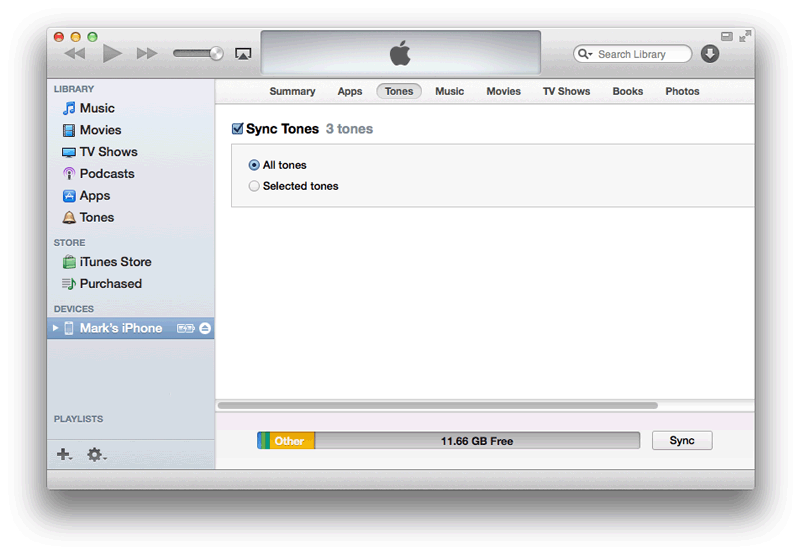
In the iPhone tab go to the Tones tab, select Sync Tones, and click Sync.
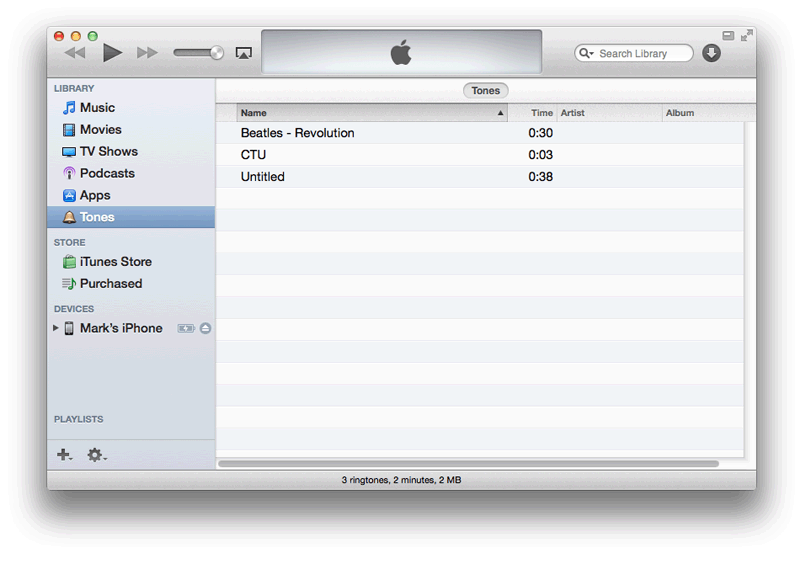
The ringtone will be placed in your list.

If you would also like to replace the system sounds here's how.
Attention
I'll be using YummyFTP to upload the files in this portion of the tutorial. These instructions can be applied to any files you want to add to your iPhone, provided you already have SSH installed. If you haven't installed SSH, or used YummyFTP before, then you must read this tutorial first.The method described below will have you manually swapping out files on the iPhone's file system directly. You may also find packages on Cydia that will swap out these sounds much easier.
|
These are the audio files in the /System/Library/Audio/UISounds folder on 7.0 firmware:
alarm.caf beep-beep.caf - sound played when docking the iPhone. begin_record.caf - sound played when starting an audio recording begin_video_record.caf - sound played when starting a video recording ct-busy.caf ct-call-waiting.caf ct-congestion.caf ct-error.caf ct-keytone2.caf ct-path-ack.caf dtmf-0.caf - sound played when pressing 0 on the phone keypad. dtmf-1.caf - sound played when pressing 1 on the phone keypad. dtmf-2.caf - sound played when pressing 2 on the phone keypad. dtmf-3.caf - sound played when pressing 3 on the phone keypad. dtmf-4.caf - sound played when pressing 4 on the phone keypad. dtmf-5.caf - sound played when pressing 5 on the phone keypad. dtmf-6.caf - sound played when pressing 6 on the phone keypad. dtmf-7.caf - sound played when pressing 7 on the phone keypad. dtmf-8.caf - sound played when pressing 8 on the phone keypad. dtmf-9.caf - sound played when pressing 9 on the phone keypad. dtmf-pound.caf - sound played when pressing # on the phone keypad. dtmf-star.caf - sound played when pressing * on the phone keypad. end_record.caf - sound played when ending an audio recording end_video_record.caf - sound played when ending a video recording jbl_ambiguous.caf jbl_begin.caf jbl_cancel.caf jbl_confirm.caf jbl_no_match.caf lock.caf - is the sound played when pressing the Sleep/Wake button. long_low_short_high.caf low_power.caf mail-sent.caf - is the sound played when sending an email. middle_9_short_double_low.caf Modern (folder) - airdrop_invite.caf, calendar_alert_chord.caf, camera_shutter_burst_begin.caf, camera_shutter_burst_end.caf, camera_shutter_burst.caf, sms_alert_aurora.caf, sms_alert_bamboo.cf, sms_alert_circles.caf, sms_alert_complete.caf, sms_alert_hello.caf, sms_alert_input.caf, sms_alert_keys.caf, sms_alert_note.caf, sms_alert_popcorn.caf, sms_alert_synth.caf New (folder) - Anticipate.caf, Bloom.caf, Calypso.caf, Choo_Choo.caf, Descent.caf, Fanfare.caf, Ladder.caf, Minuet.caf, News_Flash.caf, Noir.caf, Sherwood_Forest.caf, Spell.caf, Suspense.caf, Telegraph.caf, Tiptoes.caf, Typewriters.caf, Update.caf new-mail.caf - is the sound played when an email is received. photoShutter.caf - is the sound played when taking a picture. ReceivedMessage.caf RingerChanged.caf SentMessage.caf shake.caf short_double_high.caf short_double_low.caf short_low_high.caf SIMToolkitCallDropped.caf SIMToolkitGeneralBeep.caf SIMToolkitNegativeACK.caf SIMToolkitPositiveACK.caf SIMToolkitSMS.caf sms-received1.caf - is the sound called Tri-tone, for text message receipt. sms-received2.caf - is the sound called Chime, for text message receipt. sms-received3.caf - is the sound called Glass, for text message receipt. sms-received4.caf - is the sound called Horn, for text message receipt. sms-received5.caf - is the sound called Bell, for text message receipt. sms-received6.caf - is the sound called Electronic, for text message receipt. sq_alarm.caf sq_beep-beep.caf sq_lock.caf sq_tock.caf Swish.caf Tink.caf Tock.caf tweet_sent.caf unlock.caf - is the sound played when you "slide to unlock". This sound has been deactivated in iOS 7. Install the Cydia package UnlockSound7 to re-enable it. ussd.caf vc~ended.caf - is the sound played when a FaceTime call ends. vc~invitation-accepted.caf - is the sound played when a FaceTime call inviation is accepted. vc~ringing.caf - is the sound played when a FaceTime call is ringing. Voicemail.caf - is the sound played when you receive a voicemail message. |
If you don't already have a sound file you like in .caf format, then here's how to use iTunes to help you convert it. Choose a file on your computer that you like. Here's my example in iTunes. Note it's in mp3 format already.

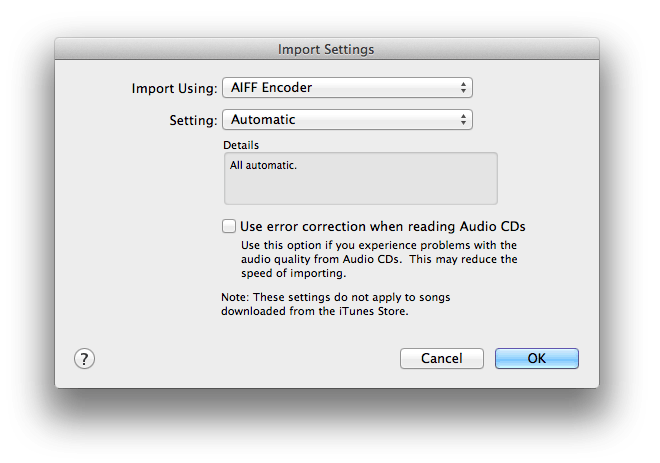
The first step is converting your file to aiff format. Click iTunes, Preferences, and then the General tab. Click the Import Settings... button.

At the next screen make sure you select AIFF Encoder from the Import Using drop down box. Click OK. You may want to switch this back when you are done, just be aware that this is how you change file formats with iTunes.
Right click the file and select Create AIFF Version.

The conversion will be made and the sound will be placed in your library. You should have an mp3 and an aiff version.

Remove the aiff file out of iTunes to your desktop. Click the file name so it becomes editable. Change the aif extension to caf. You'll be prompted to confirm the extension change. Click "Use .caf".

There's the properly formatted .caf. Now you need to name the file the same thing as the file on the iPhone you want to replace. In my case I want to change the lock.caf file with my own. So I renamed it.

Use SSH to navigate to the location of your new audio file and the /System/Library/Audio/UISounds folder on your iPhone.
I would rename the original lock.caf file to something else, before moving your new unlock.caf file into this folder. That way you can always go back to the original sound. You will need to reboot or respring the iPhone for the change to take effect.

If you'd like to re-enable the unlock sound here's how.
|
For whatever reason Apple disabled the unlock sound in iOS 7. But it can not only be
easily re-enabled, but customized as well.
In Cydia, search for and install the program UnlockSound7. Launch it from the Settings application. You have two choices of where to place your custom sound file. You can do as the application directs and place your file in the /var/mobile folder and name it unlock.caf and push the Custom button and it will play... |

|

Or, you can place your file in the /System/Library/Audio/UISounds folder like we did with the lock sound. Just make sure to rename your original unlock.caf file so you don't overwrite it by mistake. You'll also need to push the Standard iOS button to play the sound.
