Downgrading & restoring older firmware - What's an ECID SHSH, APTicket, and why do I need them?
Updated: May 8, 2012Page 3 of 3
Beginning with the iPhone 3G S, a special designator called the ECID (Exclusive Chip Identification number) was incorporated into every iPhone manufactured. Apple did this as a method to thwart jailbreaking and unlocking attempts. There certainly may have been other reasons for the inclusion of this unique number.
With the introduction of iOS 4.0 firmware, Apple has also included the iPhone 3G in this plan. While the iPhone 3G doesn't have an ECID, Apple must still approve restoring to iOS 4.x firmware when requested.
This is how the ECID comes into play: When you want to restore your iPhone you connect it to the iTunes program with the USB sync cable, you click the restore button and a restore request is sent to Apple (along with your ECID). The Apple server then determines whether or not the firmware you are requesting to restore to is the current firmware available. If it is, then Apple's server takes the ECID and sends back a digital signature approving the restore to iTunes, and the restore process begins. This signature is called the SHSH (an abbreviation for Signature HaSH) and is also referred to as a blob (as a blob of data is received from Apple).
If your request is to restore to firmware that is not current, Apple denies the request by not sending a digital signature back to iTunes, and the restore process comes to a halt with an error message. This process is static and the digital signature does not change over time (for each unique firmware version). Because of this weakness, there is a simple way around obtaining this signature forever: using a locally stored SHSH (the official Apple approval) and rerouting the request from Apple's server to the Cydia server, or to an IP address on our own home network.
Saurik, the creator of Cydia, wrote at great length about this process and he created a method of using Cydia to get around this. In order to have Cydia, you must already be jailbroken.
Saurik's article is about how he has set up Cydia to grab the SHSH for everyone's iPhones. This ensures you can restore to the firmware version that you want indefinitely. All you have to do to make this work is edit a file called hosts on your computer and reroute Apple's server address (gs.apple.com) to Cydia's address (74.208.10.249). Note: As of the date of this article Cydia is not set up to handle the 5.x method of downgrading and authorizing the SHSH and the APTicket. It's uknown when/if Cydia will offer this service again.
Keep in mind when you update to a new firmware your modem firmware is usually also updated. This system will not allow you to restore to an older modem firmware, only to the older main OS firmware. Usually this is not an issue to be concerned about unless you need to unlock the iPhone.
You will be able to restore to new firmware updates as Cydia will continue to generate the file it needs for newer firmwares automatically if it has your ECID "on file". It is important to understand that you do not need to have the latest firmware on your iPhone to get the SHSH for it. Why? Because Apple will always approve restores to the most recent firmware, and thus will provide a digital signature to approve the restore.
The next step in simplifying the method of obtaining the SHSH came about when a programmer called Semaphore (@notcom on Twitter) came up with a way of expanding Saurik's concept. He recognized that while Saurik's method is very helpful, it relies on Saurik's servers to be operating (they've gone down before for several days and take a couple weeks after a new firmware is released to store the SHSH), and for the iPhone to be already jailbroken (since you need Cydia to retrieve the SHSH.)
Semaphore created a program called TinyUmbrella. It can retrieve the SHSH for an iPhone, and the phone doesn't even need to be jailbroken or connected to your Mac (except for the first time)! It can also retrieve the SHSH directly from Cydia (if it has them to begin with). The iPhone doesn't need to be on the most recent firmware for TinyUmbrella retrieve the SHSH for it. When TinyUmbrella saves your SHSH it also sends this request along to Cydia so that it will also have this signature. The SHSH is converted into a file and stored on your computer. You can also back up these files for safekeeping. When you are ready to restore to an older firmware, you start up the server program within TinyUmbrella. It modifies your hosts file automatically and masquerades as Apple's digital signature server. It then uses the file already stored on your computer to approve the restore request. Note: This method is currently not being used with 5.x firmware. Currently you create a custom firmware including the SHSH (including the APTicket), place the iPhone into recovery mode (iPhone 4S) or DFU mode (iPhone 3G S and iPhone 4) and then restore it with redsn0w (iPhone 4S) iTunes (iPhone 3G S and iPhone 4).
With the introduction of 5.0 firmware Apple has added a new layer of security to prevent anyone from restoring to firmware they don't approve of. They have now activated the since dormant APTicket. What this does, in effect is reset the SHSH signature each time that the iPhone is rebooted or restored. This would have made it useless to save SHSH files to attempt to restore with as the signature would not stay the same. I don't technically understand how this security measure was overcome. A Windows only program called iFaith was the first program that could get around this security measure, but now redsn0w has this feature too. You can use TinyUmbrella in conjunction with redsn0w to downgrade 5.x firmware. TinyUmbrella will retrieve the SHSH and APTicket, and redsn0w will create a custom firmware file incorporating the SHSH and APTicket so that iTunes and the iPhone will be tricked into restoring older firmware.
You can read a more technical explanation about the APTicket at the iPhone Dev Team's site here.
Using TinyUmbrella
You can download TinyUmbrella here.When you first launch the program it will look like this.
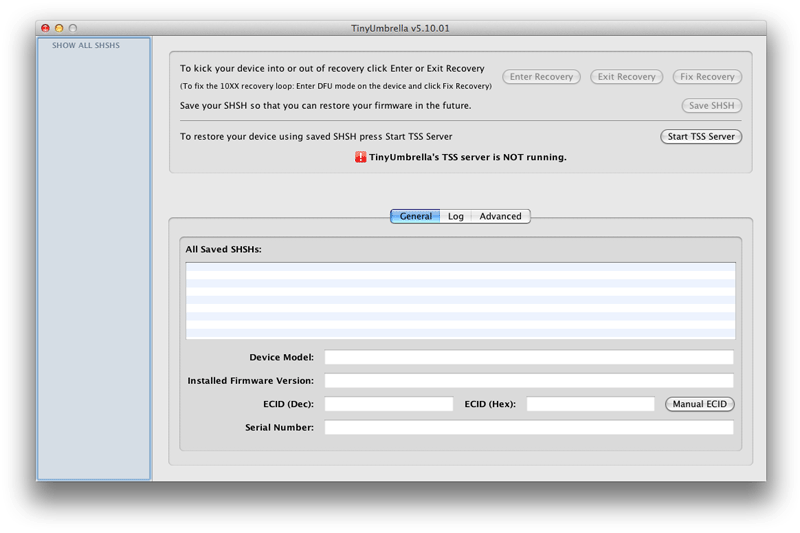
Connect your iPhone to your Mac and you'll see your iPhone's name under the connected devices header on the left. Some information about your iPhone will appear toward the bottom of the screen. Now click the Save SHSH button on the right. It may take a minute to retrieve any/all the SHSHs for that particular device. Repeat this process for as many different iPhones, iPads or iPod Touches that you have.

TinyUmbrella stores SHSH files in a hidden folder located at /Users/<your user name>/.shsh by default. You can change this by clicking the Advanced tab then click the ... button and enter the path where you want the files saved. If you decide to leave this path alone then you'll need to copy the contents of this folder and place it somewhere else as redsn0w will not be able to see this hidden folder later in the instructions.
If you've been using TinyUmbrella in the past, make sure it has not modified your hosts file. Make sure the check box for "Set Hosts to Cydia on Exit" is not checked. If it is, uncheck it, close the program and reopen it and it will fix your hosts file.

If you want to see what your hosts file looks like anyway, go to your Applications folder, then into the Utilities folder. Launch the program called Terminal. Then enter this line:
sudo nano /private/etc/hosts
You will be prompted to enter your password for your Mac.

Note any lines that say gs.apple.com. There must be a # symbol at the beginning of the line(s). This # symbol tells the computer to ignore processing this line. If there isn't a # symbol then insert one there, then press and hold the control key while pressing o to write the file. Press enter at the prompt for /private/etc/hosts to save it.

When a new firmware and a new version of TinyUmbrella are released all you have to do is update the program then click where it says SHOW ALL SHSHS, then click the button that says Save ALL SHSHs. You'll notice spinning wheels next to your devices. After a minute or two you'll see the new SHSHs.
TinyUmbrella has a feature called the TSS server. We used to use this on 4.x firmware. To see how this feature functioned in the past read this page.
Cydia
After using TinyUmbrella to download my SHSHs for my iPhone 4S, I noticed that the next time I used Cydia it displayed SHSH: iOS 5.0.1, 5.0.1r1.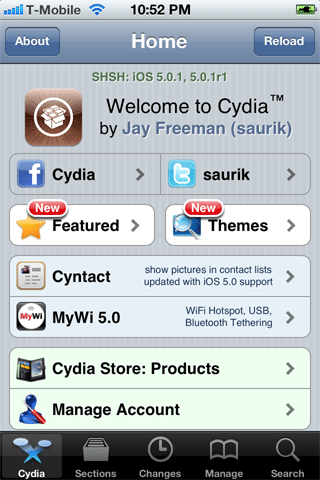
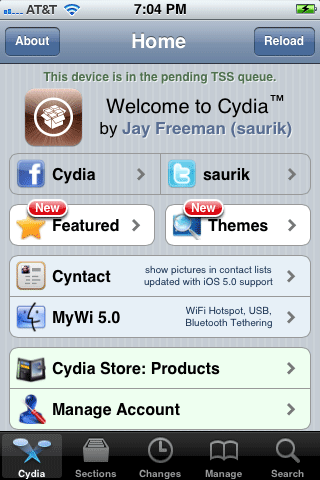
If you purchase a new iPhone and jailbreak it and launch Cydia you will be greeted with this message: This device is in the pending TSS queue. This means that Cydia will eventually save an SHSH on its server for later access.