Read me first
I have a lot of content on this site so I made this page as an introduction to the iPhone hacking scene. Consider it a good starting point for what I have to offer. My tutorials require an Intel-based Mac.These are the topics I will cover:
- What is jailbreaking, and why should I do it?
- How is unlocking different from jailbreaking?
- What jailbreaking has to offer.
- Let's jailbreak and unlock!
What's jailbreaking, and why should I do it?
Jailbreaking is a process where you modify your iPhone so that you can purchase and install programs from any software company you want to. The term jailbreaking refers to the fact that the code running on the iPhone is in a programming jail so that it can't be modified by the end user (you). Without getting too technical, all the programs on the iPhone run inside of a programming sandbox. This sandbox only allows Apple approved software (purchased through the App Store) to be installed.When you jailbreak, you add the ability to run non-App Store purchased programs. By bringing your own programs to play with in the Apple sandbox, you greatly increase the functionality of the iPhone.
Let me put this to you another way... I own an Apple laptop computer. I want to purchase the Adobe Photoshop program. This is a powerhouse image editing application and isn't in the Mac App Store. Apple allows me to go to Adobe directly and purchase Photoshop from them and then install it on my laptop computer. What's the difference who I purchase my iPhone programs from?
Most new "features" on the iPhone (including the very App Store itself), in stores right now, came from the jailbreak community. Some of these features are: custom ringtones, custom wallpaper on the home screen, cut and paste, Notification Center, large format app switcher, toggles for services like Wi-Fi, et cetera. The jailbreaking community has constantly innovated features that users want for the iPhone. Apple continually incorporates these features into upcoming models of the iPhone as a selling point. The jailbreak community has even patched serious flaws in the iPhone when they discovered them to help protect jailbreakers. Apple then includes these patches in their future software releases to protect its customers.

Jailbreaking an iPhone is legally allowed. The Library of Congress included jailbreaking as an allowed exemption to the Digital Millennium Copyright Act (DMCA) as found in the United States Code of Federal Regulations, Title 37 Part 201.40, in 2010. You can read their ruling here. Paragraph 2 specifically applies to this. Note that jailbreaking was never illegal. This decision only gives end users legal grounds to jailbreak, not that they need protection from something.
Jailbreaking is generally safe for your iPhone and cell phone network. Thousands of beneficial applications exist in Cydia. These apps are only available via jailbreaking. The app approval process at Apple doesn't always make sense, and just because an app made it through the Apple approval process doesn't necessarily mean that app is safe either. Apple likes to claim they're protecting the iPhone's security, and that of their cell phone network partners' security. I haven't heard of a single issue where a cell phone network was compromised because of jailbreaking or unlocking, and jailbreakers have been doing this since 2007!
Jailbreaking is a generally risk-free process that will not void your warranty, provided you can restore your iPhone with iTunes. After restoration the jailbreak is removed. Jailbreaking is a transparent process. Everything that Apple provided on your iPhone should continue to work normally once you have jailbroken. Please don't let naysayers limit what you do with your phone in the name of privacy and security as the App Store has failed numerous times in these arenas.
How's unlocking different from jailbreaking?
While jailbreaking lets you use any programs you want to on your iPhone, unlocking is an additional process performed on an already jailbroken iPhone. Unlocking is removing the restriction put in place by Apple that limits the iPhone to operating on a particular cellular network. You can always roam, but at greatly increased rates of service. When you unlock an AT&T or a T-Mobile iPhone, it allows it to operate on any network in the world that uses the GSM standard (the most widely adopted cellular phone standard on the planet). You simply remove one SIM card and insert the SIM card of the network you want to use and the iPhone will connect to that network.
Unlocking (from a CDMA perspective) doesn't apply to the Sprint or Verizon networks. These providers must provision your iPhone to work on their network. You can't just run an unlocking program to gain access to their network at will, like you can with GSM networks. iPhones that use GSM technology only can't be made to operate with CDMA network providers.
The Digital Millenium Copyright Act (DMCA) no longer protects the ability to unlock a cell phone purchased locked from a carrier beginning in January of 2013. Because of this, new unlocking tutorials will no longer be provided on this site beginning with the iPhone 5. Unlocking iPhones purchased prior to 2013 is still allowed and those tutorials are still available.
Keep in mind AT&T (and presumably T-Mobile) will unlock the iPhone. Sprint and Verizon models come with the GSM SIM slot unlocked and you can purchase a factory unlocked iPhone direct from Apple. So you have plenty of options. You'll also have a warranty protecting that unlocked iPhone. Since Apple has made it so easy to purchase a new, unlocked iPhone with a warranty, I'd recommend this method of obtaining one.
There are two types of cell phone service providers in the United States: those that use GSM technology (AT&T, T-Mobile, H2O, Net10, Simple Mobile) and those that use CDMA technology (Verizon, Sprint, Cricket, Boost). There are probably other smaller regional carriers as well. They are also divided into these cateogries.
What jailbreaking has to offer.
While Apple's App Store is fantastic, it won't provide you with many amazing programs that you can install once you are jailbroken. In fact, there are many programs you will never see on the App Store because of Apple's strict and often capricious rules for approval. Cydia (an alternative to the App Store) is the program that is automatically installed when jailbreaking and the vast majority of the content it offers is free!The iPhone hacking community is well established and has been around since the days the first iPhone went on sale in the summer of 2007. With the creation of Installer, and then later Cydia, the community created the foundation for the distribution of third party applications. Apple saw this and witnessed the success of this distribution model. They were a driving force behind the creation of the App Store (so much for web apps huh, Steve?). Apple was then able to monetize the distribution of third party software on the iPhone.
So what're some of these programs?
How would you like to use Siri on your iPhone 4? If you jailbreak it and use the Spire program, then you can! Of course you will need access to an iPhone 4S so that you can retrieve data keys from it to enable on other iPhones. I have tutorials for two different methods on how to do this. There is even a free program that lets Siri translate phrases into other languages! This is all free!

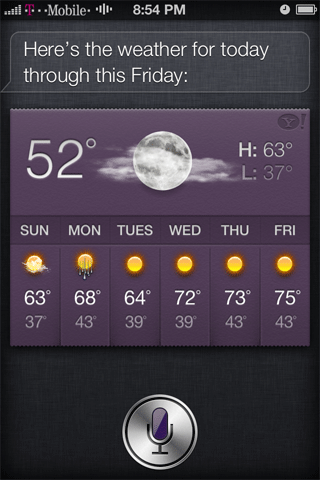
If you have an iPhone 4S you can greatly expand on what Siri can do for you by adding new commands, and even customizing its replies through a program called MyAssistant. You can even use Siri hands free if you install the Hands-Free Control program!


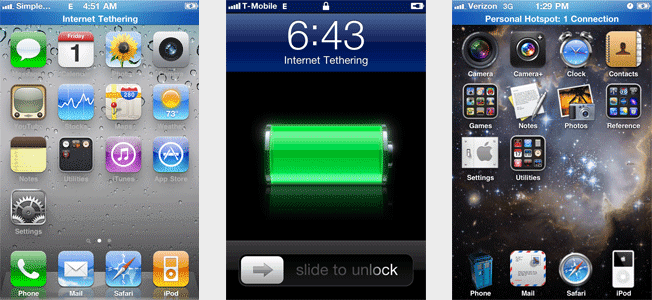
How about the ability to tether with your iPhone, without a tethering plan? Ultimately it's your responsibility if you comsume lots of data with your iPhone and your service provider wants you to pay for a tethering plan. This is a convenient feature when you are on the go and there is no Wi-Fi to be found for your laptop computer. Yes you can tether with an AT&T GoPhone plan, Simple Mobile, Sprint, T-Mobile, and Verizon. I have a tutorial for how to do this.
Would you like to potentially increase your odds of retrieving your lost or stolen iPhone? While Apple has the Find My iPhone service that provides you with a map location of your iDevice, and allows you to set a remote passcode lock and perform a remote wipe, there are a couple of jailbreak only programs that do more to aid in the recovery of your iPhone.
ICaughtU (free) and ICaughtU Pro (paid) - Takes a picture using the front facing camera when the passcode is entered incorrectly (you set the attempt threshold), or when someone attempts to turn the phone off, and then uses e-mail or SMS to send the photo or the location of the person.
iGotYa' - Offers a 10 day free trial. It has the same features as ICaughtU, but also offers a Secure Mode where you can still have access to your iPhone even after entering the passcode incorrectly, however all your personal data (SMS, pictures, call history, contacts, etc.) will be hidden.

| How would you like to use FaceTime over your 3G / EDGE / GPRS connection when you are on the go, instead of being restricted to Wi-Fi? Well if you jailbreak you can! All you have to do is purchase 3G Unrestrictor. You can also download programs larger than 20 megabytes from the App Store over 3G, which is normally restricted to Wi-Fi only. You can also watch YouTube videos in high quality, or watch TV programs over SlingPlayer or other TV applications. |

|

|
Syncing your iPhone to multiple iTunes accounts would be pretty cool. If you use the program MultiTunes this is easily done. Why be limited to just one library of music?


|
Would you like to have the ability to opt out of data mining services which have their code embedded in some App Store applications? The reasons for this data mining seem harmless enough - developers just want to track how users use their program. If you would like the option to not be tracked, you can install a program called PrivaCy. This program was made by the creator of Cydia and in conjunction with the data tracking service companies in question. Once installed, you are presented with a control panel for opting out of each individual service. |

|

|
There are free games written specifically for jailbroken iPhones like MacMan. This is only available via Cydia. |
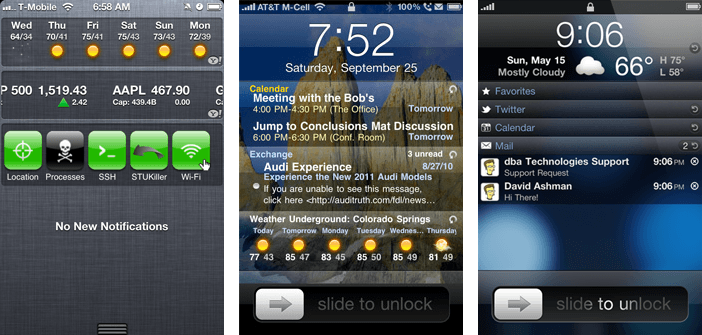
While Apple includes a notification center to place (most) important information directly on your lock screen, you do have options that can further expand this functionality. IntelliScreenX and LockInfo to the rescue! You can add practically anything to the lock screen like e-mail, weather, the stock ticker, FaceBook, Twitter, RSS feeds, missed calls, calendar events, notifications and SMS.
From left to right: Apple notification center, IntelliScreen and LockInfo. There are numerous possible configurations, these images display only one configuration. Both IntelliScreen and LockInfo offer trial versions.
WinterBoard can "theme" the look of your iPhone with just a couple button pushes. Themes can be quite extensive and change the visual look of most everything on your phone like the Mail application, or Weather, Calculator, Messages, your iPod player and your lock screen. Below you are seeing different home screen themes. The themes pictured below are called Chromatic Neon, Glass Orb and Vending Machine Free and can be found in Cydia. I have instructions for how to theme your iPhone.


Since this is a phone, and you’ll be spending a lot of time dialing phone numbers, why not change the phone keypad as well? The standard phone keypad sure is rather plain looking. Check out this pay phone style look. On the far right is a personal photo of mine. Even better! I have a tutorial for how to do this.

|

|

|
|
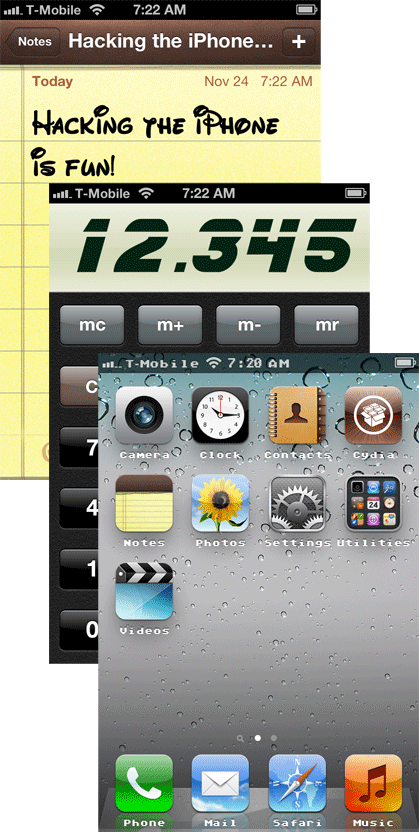
If you jailbreak you can even change the fonts system wide! I have a tutorial for how to do this. While Apple provides three fonts for use with the Notes application: (Helvetica, Marker Felt and Noteworthy), you can add many others to suit your taste. Pictured from top to bottom are Walt Disney, Blade Runner Movie and Atari8bit. |

| You can customize the event sounds on your iPhone when you slide to unlock, dial a phone number, receive a new email or SMS and relock your phone just to name a few. Why be stuck with the same exact sounds that every other iPhone has? There are many WinterBoard themes that can do this, or you can use SSH to do it yourself. I have a tutorial for how to do this. |

|
Apple has lots of features on the iPhone that can be turned on and off. The problem
is these buttons are all buried in different menus and it can be confusing where to find
them quickly, or just tedious to have to do over and over again.
There’s a program called SBSettings, which adds a convenient control panel to the iPhone. It is a one stop shop for turning on and off various services on your phone like: 3G, Edge, Wi-Fi, Bluetooth, SSH, Airplane mode, GPS location, adjusting screen brightness, killing processes, SSH, Tethering, et cetera. It is activated by simply swiping your finger across the status bar. SBSettings also has a control panel for hiding the various program icons installed. If you are like most people who don’t use the Stocks application, you can just make it disappear by sliding its toggle to off. There are a plethora of options to explore in the completely free and amazing program. |
| One of my favorite programs is iBlacklist. It allows you to selectively block incoming calls from phone numbers that you don't want bothering you. This is great for blocking telemarketers, or around election time. You can also use it to block text messages. There is a similar program called MCleaner. Both applications are for sale. | 
|

|

|
Another little known fact is that the iPhone is limited to eleven pages of icons.
Once you reach this limit, any new programs you install through the App Store will not
display on the iPhone, so you won't have any way to run those programs unless you do a
Spotlight search for them. With 4.0 firmware Apple finally introduced folders, but
implements them in a limited way: you can only have 12 icons in a folder. Why this
limitation?
If you jailbreak, you can use a program called Infinifolders, which allows an unlimited amount of applications in a folder! If you buy more programs from the App Store, no problem. When you go to sync your iPhone through iTunes, the new application is placed on the next avaialable page of your iPhone and you just simply drag it over to the folder you'd like it in. This is a paid program in Cydia. Look at that. There's at least 16 icons in this folder... |
If you really like cramming your screen full of icons you could install the programs Five Icon Dock, Five-Column SpringBoard, and Five Icon Switcher.


Or if you'd rather see just how few icons you can have on your screen, or be able to arrange them in any pattern you'd like (with gaps), then check out the Gridlock program. I've made my dock, the spotlight icon and the page dots disappear with other themes.

|
OpenSSH is a great program for interfacing with the file system on the iPhone. It
allows for secure Wi-Fi (or USB) access between the iPhone and your Mac. This allows for
transferring of files to and from, and for installation and removal of programs. You will
also need an SSH client on your Mac (unless you choose to use the Terminal). I have a
detailed tutorial for how to install this program on both the iPhone and
your Mac. When you install SSH, you can also change the well-known passwords for the root
and mobile accounts which will make your iPhone more secure. I have a tutorial for how to
do this.
|

|
iRealSMS greatly expands the abilities of SMS and MMS on the iPhone. It offers folders, drafts, text-to-voice, quick reply and quick send (from within other applications), contact pictures, smileys, templates, search ability, forward via mail, privacy settings, sent notifications, password lock, a character counter and more. Another popular SMS program is called BiteSMS.


|

|
ShakeToUndo Killer is a favorite of mine. I use the Notes application when I go grocery shopping. Sometimes just moving the phone around in my hand (or placing it in its case while I grab something off the shelf) causes the Notes application to prompt me to undo my typing. Sometimes it likes to tell me that there is nothing to undo... This program stops that behavior. |
If you enjoy watching videos on YouTube and wish you could save them easily, then MxTube is just for you. Simply search for the videos you want, then choose whether to download them in low or high quality. They will then be stored on your iPhone. If you install OpenSSH onto your iPhone you can even save the videos to your computer.


Hate that Newsstand icon and don't want to put it on its own page? Sure there's a trick where you can put it in a new folder (with great difficulty), but that brings up other issues. Cydia has a tweak which eliminates the icon (then places your Newsstand content on the springboard as individual icons instead). Check out NoNewsIsGoodNews.


There are several video game console emulators on Cydia. Here are some screen shots from NES 3 (which is a Nintendo emulator). You can also play games in landscape mode.

| Cydia also allows for developers to sell their programs, if they wish. This should be a welcome alternative to those developers who are rejected by the App Store, to still reach their target audience. Programs for sale stand out from free programs as they have a purchase button on their information page. |

|

|
The iPhone hacking community is well established, and has been around since the day the first iPhone went on sale in the summer of 2007. With the creation of Installer, and Cydia, the community created the foundation for the distribution of third party applications. Apple saw this, and witnessed the success of these two distribution models. They were a driving force behind the creation of the App Store (so much for web apps huh?), so Apple could make money from distributing third party software on the iPhone. Cydia offers the majority of its programs for free.
Here are the interfaces for Cydia and the App Store. Pretty similar looking. They function essentially the same too.


Let's jailbreak and unlock!
As a general rule when Apple releases new firmware for the iPhone it isn't immediately jailbreakable upon release. It can take a few weeks until a jailbreak is released. It can take even longer before an unlock for a new firmware is released, and is generally a more complicated method to follow.These are the topics I will cover next:
Jailbreaking issues
There are some things you should know before you perform anything on this site. There is some minor risk involved here. In a worst case scenario you simply restore your iPhone using iTunes and your phone will be back to normal. Doing this will cause you to lose your jailbreak and / or unlock, and perhaps for some time.- You potentially risk voiding your warranty (if you can't restore your iPhone to stock firmware).
- Any modifications you perform on your iPhone, including bypassing activation, jailbreaking and unlocking, could be reset (or the option to rejailbreak or unlock blocked) if you should install a firmware update provided by Apple. It is usually just a matter of re-doing everything you previously did to get your iPhone back the way you had it.
- Read the instructions in their entirety. If you can't follow directions, the potential is there for damage (only in extreme cases) to occur to your iPhone requiring a replacement that will most likely be paid for by you.
- I am not responsible for your results if they are less than what you expected. You assume all risks. I recommend seeking help in iPhone hacking forums or in the various IRC channels. The tutorials I create record the exact procedure I used on my iPhone(s).
- If you have not activated your iPhone via one of the official cell phone providers (AT&T, Sprint, Verizon, et cetera), and do not pay them for your cellular phone service, then you may lack the ability to use visual voicemail and possibly FaceTime.
- Jailbreaks and unlocks may have bugs in them causing undesirable side effects that have yet to be discovered. Sometimes these problems are solved when the programs are updated. I try to document widespread issues, but can't document everything.
iPhone models
Before you can do anything you need to determine what iPhone you have. There are currently six generations of iPhones:- The first generation iPhone (also called the 2G because it offered EDGE data connectivity, a second generation cell phone technology), released in the summer of 2007. This phone can not run firmware higher than 3.1.3.
- The second generation iPhone (also called the 3G), released in the summer of 2008. This phone can not run firmware higher than 4.2.1.
- The third generation iPhone (also called the 3G S) released in the summer of 2009.
- The fourth generation iPhone (also called the iPhone 4) released in the summer of 2010 for the AT&T network, and in February 2011 for the Verizon network. An unlocked GSM version was released in June 2011.
- The fifth generation iPhone (also called the iPhone 4S) released in the fall of 2011 for the AT&T, Sprint and Verizon networks. The iPhone is now a world phone. Because of this there is only one model of phone that handles the CDMA and GSM functionality instead of two separate models like the iPhone 4.
- The sixth generation iPhone (also called iPhone 5) was released in the fall of 2012 for the AT&T, Sprint and Verizon networks.

The iPhones on the far right are the fourth and fifth generation models (GSM and CDMA respectively) and are easily distinguished by the steel band that runs throughout the middle of the phone, with round volume buttons. It also has an all glass back panel. To tell the AT&T model apart from the Verizon model, simply look on the side opposite the volume buttons. The AT&T phone has a SIM tray, the Verizon phone does not. For the iPhone 4S there will be a SIM tray and the steel band will have two breaks in it on both sides.
What firmware is jailbreakable / unlockable?
 To determine which firmware(s) you have on your iPhone, launch the Settings
application, press General, then press About. Look at the entry for "Version" (also
referred to as firmware or OS). It will have a number next to it and another number in
parantheses. We're only concerned about the first two (or three) digit number. In my
example I have 5.1.1 firmware. So when you hear: Apple is releasing new firmware, that is
the number they are referring to.
To determine which firmware(s) you have on your iPhone, launch the Settings
application, press General, then press About. Look at the entry for "Version" (also
referred to as firmware or OS). It will have a number next to it and another number in
parantheses. We're only concerned about the first two (or three) digit number. In my
example I have 5.1.1 firmware. So when you hear: Apple is releasing new firmware, that is
the number they are referring to.
There's another firmware number you should be aware of. This is the one that says "Modem Firmware". This is also referred to as baseband. Usually every time you update your firmware or OS (i.e. 5.0), the modem firmware gets updated too. If you aren't interested in unlocking then you don't need to concern yourself with this number.
While modem firmware updates are good for most iPhone users, they are usually bad for those who want to unlock their iPhones. New firmware releases (and hasty updates by iPhone owners) cause the modem firmware to be updated. It usually takes a long time for a new unlock to be released as a vulnerability must be found in the modem firmware to allow for the unlocking process to work. Here's a real world example: When 4.0 firmware was released an unlock came out not long after. That was also the last free unlock. It was released in June of 2010! I wouldn't hold my breath waiting for another free unlock.
The image to the right is from an iPhone 4S. I've highlighted the two version numbers.
If you are using 5.x firmware, then check out my Step 1 tutorials found in the "Start here" menu of my navigation bar (viewable via the Member Access button on the main page). Not a member? Click the donation banner at the bottom of this page to join today!
If you are using 4.x firmware through 1.x, then click here for those tutorials. You do not need to be a member to read these tutorials.
Below is a list of the most recent firmwares and modem firmwares. Listings in red can not be unlocked.
| Firmware | Modem firmware (baseband) | |||
| 5.0 | 5.16.05 (3G S) | 4.11.08 (4) | 1.0.11 (4S) | |
| 5.0.1 | 5.16.05 (3G S) | 4.11.08 (4) | 1.0.13/14 (4S) | |
| 5.1* | 5.16.05 (3G S) | 4.12.01 (4) | 1.5.04 (4S) | |
| 5.1.1 | 5.16.05 (3G S) | 4.12.01 (4) | 2.0.12 (4S) | |
| 6.0* | 5.16.07 (3G S) | 4.12.02 (4) | 3.0.04 (4S) | |
|
|
||||
Note: There hasn't been a free unlock released since June of 2010! Read this page to learn about your unlocking options.
Step 1 tutorials
There are four Mac programs for jailbreaking on 5.x firmware: Absinthe, PwnageTool, redsn0w and cinject (a command line interface program which I won't be covering as the program doesn't work.)Absinthe is made by the Chronic Dev Team (who has been around the jailbreaking scene since 2008) and the iPhone Dev Team. It was specifically for jailbreaking the iPhone 4S and the iPad 2.
PwnageTool, Redsn0w (and that command line interface tool) are made by iPhone Dev Team, a group that has been creating jailbreaking programs for free since the iPhone first came out in the Summer of 2007. They also provide the free unlocking software (yellowsn0w, ultrasn0w) for the iPhone. It's probably confusing to most why there are two jailbreaking programs. The unique feature of PwnageTool is its ability to create a custom firmware file that contains the jailbreak exploit, Cydia, and all your favorite Cydia programs pre-installed. Redsn0w can not do this. I've noted the main differences in these programs below in red.
Do not pay for these programs! I know there are shady businesses out there that sell them!
Absinthe: Works with firmware 5.1.1 on all iPhones. |
|

|
|
|
This tutorial is available to members only. To become a member
click here.
The jailbreak and unlock tutorial is here. |
PwnageTool: Works with firmware 5.1.1 on iPhone 3G S / 4 only! |
|

|
|
|
This tutorial is available to members only. To become a member
click here.
The jailbreak and unlock tutorial is here. |
Redsn0w: Works with firmware 5.1.1 on all iPhones. |
|

|
|
|
These tutorials are available to members only. To become a member
click here.
The jailbreak and unlock tutorial is here. |
