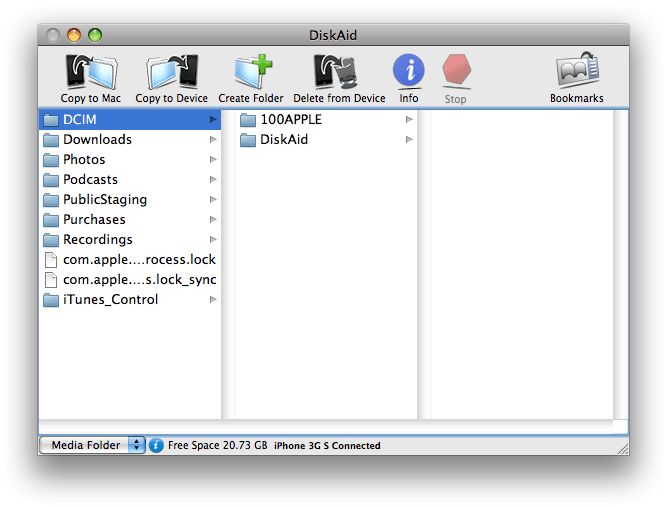
USB file transfers without jailbreaking!
Attention: This program is available as a trial. I am only writing about this program to make you aware of it. I make nothing from sales of this program. It's currently priced at $9.90. There may be free options out there. If I find them, I'll write about them as well.
Sometimes people get into trouble and are unable to use SSH to transfer files to their iPhone when the Wi-Fi isn't working, or not available. DiskAid to the rescue! This program allows for transferring of files, even to non-jailbroken iPhones, over a USB cable.
DigiDNA offers this program for both Macintosh and Windows users here. DiskAid supports all iPhones running firmware 3.0. It's so simple to use, you'll be amazed.
Step 1.
Download DiskAid here. Double click the download file to install it.
Then drag the DiskAid.app to the Applications folder.
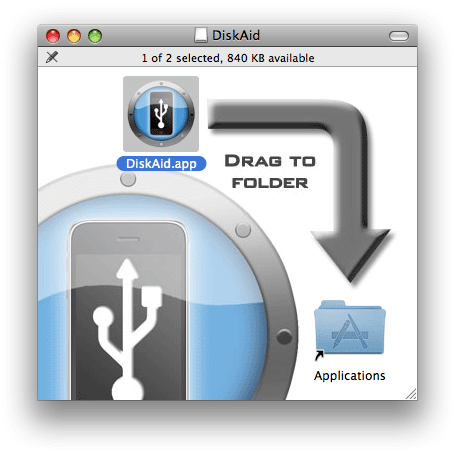
Then go to your Applications folder, and launch DiskAid.app.

Step 2.
Plug your iPhone in to your USB cable. Drag iTunes out of the way if it opens. There is a drop down box in the lower left corner of the program. You can select what level of the iPhone you want to go to: DiskAid Folder (which is in your Media/DCIM folder), the Media Folder, or the Root Folder.You have four options at the top of the program: copy whatever you select on your iPhone to a folder on your computer, copy any file from your computer to the iPhone, create a folder on the iPhone, or delete anything on the iPhone.