Things you can theme
Updated: February 16, 2013This page correctly assumes you've read these pages first:
- Using SSH to talk to the iPhone.
- Understanding a theme's directory structure.
- Converting png graphics.
I've compiled a SHORT list of graphics that can be changed on the iPhone using WinterBoard or by replacing them directly with SSH. This list was compiled using my iPhone 5. Many of these graphics will also work on the iPhone 4 and 4S.
This list will NEVER completely represent every graphic on the iPhone. Although I bet you could Google around and find one. If you need help finding graphical items I highly recommend reading or posting in this thread at MacThemes.net.
If you find a theme you like and want to know how they changed what they changed, simply install the theme then use SSH to transfer the theme to your Mac so you can analyze how they did it. You can also try programs like AppInfo and Icon Thief on Cydia to help you find where graphics are. Springtomize is a program that can also help you theme your iPhone.
Application program icons |
 |
|
Note some icons have a captial I in their name and some don't. |
|
| What | Location of graphic | WinterBoard path |
| App Store | /Applications/AppStore.app/icon@2x.png | Theme/Folders/AppStore.app/icon@2x.png |
| Calculator | /Applications/Calculator.app/icon@2x.png | Theme/Folders/Calculator.app/icon@2x.png |
| Calendar | /Applications/MobileCal.app/icon@2x~iphone.png | Theme/Folders/MobileCal.app/icon@2x~iphone.png |
| Camera | /Applications/Camera.app/Camera@2x~iphone.png | Theme/Folders/Camera.app/Camera@2x~iphone.png |
| Clock | /Applications/MobileTimer.app/icon@2x~iphone.png | Theme/Folders/MobileTimer.app/icon@2x~iphone.png |
| Compass | /Applications/Compass.app/Icon@2x.png | Theme/Folders/Compass.app/Icon@2x.png |
| Contacts | /Applications/Contacts~iphone.app/icon@2x.png | Theme/Folders/Contacts~iphone.app/icon@2x.png |
| Game Center | /Applications/Game Center~iphone.app/icon@2x.png | Theme/Folders/Game Center~iphone.app/icon@2x.png |
| iTunes | /Applications/MobileStore.app/icon@2x.png | Theme/Folders/MobileStore.app/icon@2x.png |
| /Applications/MobileMail.app/Icon@2x.png | Theme/Bundles/com.apple.mobilemail/Icon@2x.png | |
| Maps | /Applications/Maps.app/Icon-57@2x.png | Theme/Bundles/com.apple.Maps/Icon-57@2x.png |
| Messages | /Applications/MobileSMS.app/icon@2x.png | Theme/Folders/MobileSMS.app/icon@2x.png |
| Music | /Applications/Music~iphone.app/icon@2x.png | Theme/Bundles/com.apple.mobileipod/icon@2x.png |
| Newsstand | /System/Library/CoreServices/SpringBoard.app/ NewsstandIconBackground @2x~iphone.png |
Theme/Bundles/com.apple.springboard/ NewsstandIconBackground @2x~iphone.png |
| /System/Library/CoreServices/SpringBoard.app/ NewsstandIconBorder @2x~iphone.png |
Theme/Bundles/com.apple.springboard/ NewsstandIconBorder @2x~iphone.png |
|
| Nike | /Applications/Nike.app/icon@2x.png | Theme/Folders/Nike.app/icon@2x.png |
| Notes | /Applications/MobileNotes.app/icon@2x.png | Theme/Folders/MobileNotes.app/icon@2x.png |
| Passbook | /Applications/Shoebox.app/icon@2x.png | Themes/Folders/Shoebox.app/icon@2x.png |
| Phone | /Applications/MobilePhone.app/icon@2x~iphone.png | Theme/Bundles/com.apple.mobilephone/icon@2x~iphone.png |
| Photos | /Applications/MobileSlideShow.app/Photos@2x~iphone.png | Theme/Folders/MobileSlideShow.app/Photos@2x~iphone.png |
| Reminders | /Applications/Reminders.app/icon@2x.png | Theme/Folders/Reminders.app/icon@2x.png |
| Safari | /Applications/MobileSafari.app/icon@2x~iphone.png | Theme/Folders/MobileSafari.app/icon@2x~iphone.png |
| Settings | /Applications/Preferences.app/icon@2x~iphone.png | Theme/Folders/Preferences.app/icon@2x~iphone.png |
| Stocks | /Applications/Stocks.app/icon@2x~iphone.png | Theme/Folders/Stocks.app/icon@2x~iphone.png |
| Videos | /Applications/Videos.app/icon@2x.png | Theme/Folders/Videos.app/icon@2x.png |
| Voice Memos | /Applicatons/VoiceMemos.app/icon@2x.png | Theme/Folders/VoiceMemos.app/icon@2x.png |
| Weather | /Applications/Weather.app/icon@2x.png | Theme/Folders/Weather.app/icon@2x.png |
Audio |
|
You can change most any sound on the iPhone with your own sound. Things like slide
to unlock, the lock sound, e-mail, text message sounds, et cetera. For a tutorial on
how to create audio files and convert them properly, along with a master list of the names
of the audio files on the iPhone, click
here.
Location of file /System/Library/Audio/UISounds WinterBoard path Theme/UISounds/<original file name.caf> |
Battery icons |
 |
|
There are 17 graphics that represent the various states of charge of the battery. These are displayed only when the iPhone is plugged in and being charged. There is also a mask graphic which makes a reflection of the battery. |
|
| Location of graphic | WinterBoard path |
| /System/Library/CoreServices/SpringBoard.app/BatteryBG_1@2x.png Continue this naming convention up to _17@2x.png | Theme/Folders/SpringBoard.app/BatteryBG_1@2x.png Continue this naming convention up to _17@2x.png |
| /System/Library/CoreServices/SpringBoard.app/BatteryReflectionMask@2x.png | Theme/Folders/SpringBoard.app/BatteryReflectionMask@2x.png |
Additional notes |
| There is a graphic that masks the battery graphic reflection. Making it black will eliminate the reflection. This graphic is normally a gradient and is found here: /System/Library/CoreServices/SpringBoard.app/BatteryReflectionMask@2x.png |
Camera icon (on lockscreen) |
  |
|
If you want this icon to go away then install "No LockScreen Camera" from Cydia. You can't just swap out the graphic with a blank graphic. If you do you'll be left with a gap where the graphic was, even if you replacement is 1 pixel by 1 pixel. Be advised that when you receive a phone call a similar sized icon with a phone handset will appear where the camera button used to be. I haven't figured out how to remove this yet. |
|
| Location of graphic | WinterBoard path |
| /System/Library/CoreServices/SpringBoard.app/CameraGrabber@2x~iphone.png | Theme/Folders/SpringBoard.app/CameraGrabber@2x~iphone.png |
Carrier bars |
 |
|
Two sets of icons are needed. White on black etch looks best on black backgrounds and white on black shadow looks best on white backgrounds. |
|
| Location of graphic
Embedded within the Shared@2x~iphone.artwork file. WinterBoard path Theme/UIImages/ Dark background icons: WhiteOnBlackEtch_0_Bars@2x.png, WhiteOnBlackEtch_1_Bars@2x.png, WhiteOnBlackEtch_2_Bars@2x.png, WhiteOnBlackEtch_3_Bars@2x.png, WhiteOnBlackEtch_4_Bars@2x.png, WhiteOnBlackEtch_5_Bars@2x.png Light background icons: WhiteOnBlackShadow_0_Bars@2x.png, WhiteOnBlackShadow_1_Bars@2x.png, WhiteOnBlackShadow_2_Bars@2x.png, WhiteOnBlackShadow_3_Bars@2x.png, WhiteOnBlackShadow_4_Bars@2x.png, WhiteOnBlackShadow_5_Bars@2x.png |
Carrier logos |
 |
|
As usual T-Mobile graphics are a mystery for those of us in the United States. My theme
from 5.x just works. Under 5.x there were three graphics. One that looks good on white
(Default), black (FSO) and one for the notification center background (TS). I find the
FSO graphic can be used as a TS graphic. I had to use all three graphics to make it
display. Using just any single graphic would fail. You can download my T-Mobile graphics
here.
You can also try using the program called Zeppelin on Cydia. |
| Location of graphic (AT&T) | WinterBoard path (AT&T) |
| /System/Library/Carrier Bundles/iPhone/ATT_US.bundle/FSO_CARRIER_ATT@2x.png | Theme/Bundles/com.apple.ATT_US/FSO_CARRIER_ATT@2x.png |
| /System/Library/Carrier Bundles/iPhone/ATT_US.bundle/TS_CARRIER_ATT@2x.png | Theme/Bundles/com.apple.ATT_US/TS_CARRIER_ATT@2x.png |
| Location of graphic (T-Mobile) | WinterBoard path (T-Mobile) |
| Unknown. | Theme/Bundles/com.apple.Unknown/Default_CARRIER_TMOBILE_1only_@2x.png |
| Unknown. | Theme/Bundles/com.apple.Unknown/FSO_CARRIER_TMOBILE_1only_@2x.png |
| Unknown. | Theme/Bundles/com.apple.Unknown/TS_CARRIER_TMOBILE_1only_@2x.png |
Custom text strings |
 |
|
These files contains various text strings found on the iPhone like: slide to power off, slide to unlock, slide to reply, slide to answer, et cetera. I use a special set of thin sliders so I like to remove the text for these events. The paths below are specifically for these events. Edit the messages to make them say what you would like. Keep in mind the messages must be short or they will be truncated when displayed. If choosing to not display a message, you may need to leave a blank space between " ". I use the program BBEdit to work on .strings files. |
|
Location of file & WinterBoard path
Edit the text "slide to answer".
/System/Library/SpringBoardPlugins/IncomingCall.servicebundle/English.lproj/Localizable.strings
WinterBoard path is: Theme/Bundles/com.apple.mobilephone.incomingcall/en.lproj/Localizable.strings
Edit the text "slide to listen".
I haven't found this yet. It is not in the same file as slide to power down. Tried that already.
Edit the text "slide to power down" or "slide to unlock".
/System/Library/CoreServices/SpringBoard.app/English.lproj/SpringBoard.strings
WinterBoard path is: Theme/Folders/SpringBoard.app/en.lproj/SpringBoard.strings
Edit the text "slide to reply". This is for text messages. I don't have a WinterBoard path.
/System/Library/BulletinBoardPlugins/SMSBBPlugin.bundle/en.lproj/SMSBBPlugin.strings
Edit the text "slide to stop alarm". I don't have a WinterBoard path.
/Applications/MobileTimer.app/English.lproj/Localizable.strings
Dock background |
 |
|
In order to change this graphic (and many others in the SpringBoard) you must rename (much safer than deleting) the corresponding graphic (ending in .cptbitmap) in this folder: /private/var/mobile/Library/Caches/com.apple.springboard.sharedimagecache/Persistent
Location of graphic /System/Library/CoreServices/SpringBoard.app/SBDockBG@2x~iphone.png WinterBoard path Theme/Folders/SpringBoard.app/SBDockBG@2x~iphone.png |
|
Dock icon reflections |
 |
|
Any icons placed in your dock will have a reflection which fades away toward the bottom of the screen. You remove the reflection by creating a transparent graphic. You could also just rename the graphic and then it wouldn't load. |
|
| Location of graphic
/System/Library/CoreServices/SpringBoard.app/SBDockMask@2x.png WinterBoard path Theme/Folders/SpringBoard.app/SBDockMask@2x.png |
Dock icon shadows |
 |
|
Any icons placed in your dock will have a shadow (not to be confused with a reflection), though it is hard to see with the stock dock and the reflection graphics. You remove the shadow by creating a transparent graphic. You could also just rename the graphic and then it wouldn't load. See also Icon shadows and Switcher icon shadows, as they use different graphics. |
|
|
Location of graphic
/System/Library/CoreServices/SpringBoard.app/WallpaperIconDockShadow@2x~iphone.png WinterBoard path Theme/Folders/SpringBoard.app/WallpaperIconDockShadow@2x~iphone.png |
Folder icon background |
 |
|
This is the graphic that appears as a folder icon background. Location of graphic /System/Library/CoreServices/SpringBoard.app/FolderIconBG@2x~iphone.png WinterBoard path Theme/Bundles/com.apple.springboard/FolderIconBG@2x~iphone.png |
|
Folder switcher background |
 |
|
This is the graphic that appears when opening a folder or the task switcher. Location of graphic /System/Library/CoreServices/SpringBoard.app/FolderSwitcherBG-568h@2x~iphone.png WinterBoard path Theme/bundles/com.apple.springboard/FolderSwitcherBG-568h@2x~iphone.png Additional notes To install this you must first go to /var/mobile/Library/Caches/com.apple.springboard.sharedimagecache/Persistent and delete the following 5 files: FolderSwitcherLinen.0.cpbitmap, FolderSwitcherLinen.1.cpbitmap, FolderSwitcherLinen.2.cpbitmap, FolderSwitcherLinen.3.cpbitmap, FolderSwitcherLinen.4.cpbitmap. Then launch WinterBoard and apply your theme change. These five files will be regenerated on respring. To remove the theme first delete the five files then deselect it in WinterBoard. |
|
Icon mask |
 |
|
When you press an icon it gets darker to indicate its selection. You remove the darkening overlay by creating a transparent graphic or deleting (not renaming) the file. There are two other graphics of interest: AppIconOverlay@2x~iphone.png (adds the shine effect to the top of the icon), and AppIconShadow@2x~iphone.png. |
|
|
Location of graphic
/System/Library/PrivateFrameworks/MobileIcons.framework/AppIconMask@2x~iphone.png WinterBoard path Unknown |
Icon shadows |
 |
|
All icons have a shadow. You remove the shadow by creating a transparent graphic. You could also just rename the graphic and then it wouldn't load. See also Dock icon shadows and Switcher icon shadows, as they use different graphics. |
|
|
Location of graphic
/System/Library/CoreServices/SpringBoard.app/WallpaperIconShadow@2x~iphone.png WinterBoard path Theme/Folders/SpringBoard.app/WallpaperIconShadow@2x~iphone.png |
Lockscreen clock (shaded bar) |
 |
|
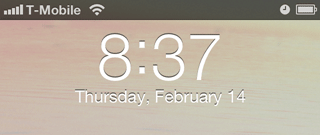
This is the shaded bar that appears behind the clock and date to make it easier to
read on light backgrounds. The graphic is only 1 pixel wide and is stretched across the
width of the screen.
If you have an iPhone 5, removing this graphic will reveal another new graphic that must also be removed. It's a thin line that runs horizontally through the clock. The graphic is in the Shared Artwork folder. The easiest way to replace this is to make a transparent .png that is 2 pixels wide by 6 pixels high. Place it in Theme/UIImages/UINavigationBarShadow@2x.png Location of file /System/Library/PrivateFrameworks/TelephonyUI.framework/BarLCD@2x~iphone.png Embedded within the Shared@2x~iphone.artwork file. WinterBoard path Theme/Folders/TelephonyUI.framework/BarLCD@2x~iphone.png Theme/UIImages/UINavigationBarShadow@2x.png |
|
Lockscreen clock (font) |
 |
|
You have a couple options if you want to change the font. You could use a program like
BytaFont or you could create a simple info.plist file, and tell it that you want to use a
font that already exists on your iPhone to take the place of the standard font. For a
complete list of fonts, go to /System/Library/Fonts/Cache.
You can download a sample .plist here. Decompress this file and place the .plist into Theme/Info.plist. |
|
Lockscreen clock & date hide |
 |
|
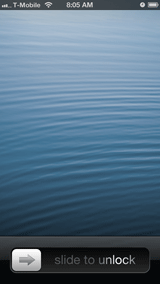
This will hide the clock and date on the lockscreen. Look for "Lockscreen Clock Hide" on Cydia. This is the easiest way. You can also use this clear font file to replace the LockClock.ttf found here: /System/Library/Fonts/Cache. Remember to backup or rename the original file you are replacing! You could also edit the DateFormats.plist found at /private/var/mobile/library/cahces. Look for the key UINoAMPMTimeFormat, and erase the characters "h:mm" from the string. Then look for the key UIWeekdayNoYearDateFormat, and erase the characters "EEEE, MMMM d" from the string. |
|
Notification background |
 |
|
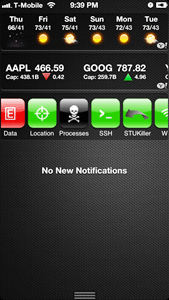
This is the gray linen background that appears when swiping from top to bottom on your iPhone. |
|
|
Location of graphic
/System/Library/CoreServices/SpringBoard.app/BulletinListLinen-568h@2x.png WinterBoard path Theme/Folders/SpringBoard.app/BulletinListLinen-568h@2x.png |
Notification badges |
 |
|
Background for # of calls, messages, etc. missed and push notifications. This badge is different from the one inside the phone application for Recents and Voicemail. Location of graphic /System/Library/CoreServices/SpringBoard.app/SBBadgeBG@2x.png WinterBoard path Theme/Folders/SpringBoard.app/SBBadgeBG@2x.png |
|
Notification bubble |
 |
|
When you miss a phone call, et cetera, this black bubble and a message appears on your lockscreen. |
|
|
Location of graphic
/System/Library/CoreServices/SpringBoard.app/BulletinListLockScreenFirstAlertBG@2x~iphone.png WinterBoard path Theme/Folders/SpringBoard.app/BulletinListLockScreenFirstAlertBG@2x~iphone.png |
Page indicators |
|
|
|
These are the dots toward the bottom of the screen used to indicate which page of your home screen you are on. They have both a white and gray state. Location of graphic /System/Library/Frameworks/UIKit.framework/Shared@2x.artwork or Shared@2x~iphone.artwork (I don't know to decrypt the new .artwork files yet.) WinterBoard path Theme/UIImages/UIPageIndicator.png Theme/UIImages/UIPageIndicatorCurrent.png. |
||

Slider "tray" |
 |
|
This is the graphic that the slide to answer, power off and unlock buttons travel in when moving left to right. Location of graphic /System/Library/PrivateFrameworks/TelephonyUI.framework/WellLock@2x~iphone.png WinterBoard path Theme/Folders/TelephonyUI.framework/WellLock@2x~iphone.png Additional notes If you would rather replace the slide motion with a tap, try out the theme Tap To Unlock on Cydia. It will replace your slider graphics, eliminate the slider tray and clear the three text strings for a cleaner look. |
|
Slide to answer button |
 |
|
Location of graphic /System/Library/PrivateFrameworks/TelephonyUI.framework/bottombarknobgreen@2x~iphone.png WinterBoard path Theme/Folders/TelephonyUI.framework/bottombarknobgreen@2x~iphone.png Additional notes To change the text slide to answer, see the Custom text strings section. If you would rather replace the slide motion with a tap, try out the theme Tap To Unlock on Cydia. It will replace your slider graphics, eliminate the slider tray and clear the three text strings for a cleaner look. |
|
Slide to power off button |
 |
|
Location of graphic /System/Library/PrivateFrameworks/TelephonyUI.framework/bottombarknobred@2x~iphone.png WinterBoard path Theme/Folders/TelephonyUI.framework/bottombarknobred@2x~iphone.png Additional notes To change the text slide to power off, see the Custom text strings section. If you would rather replace the slide motion with a tap, try out the theme Tap To Unlock on Cydia. It will replace your slider graphics, eliminate the slider tray and clear the three text strings for a cleaner look. |
|
Slide to unlock button |
 |
|
Location of graphic /System/Library/PrivateFrameworks/TelephonyUI.framework/bottombarknobgray@2x~iphone.png WinterBoard path Theme/Folders/TelephonyUI.framework/bottombarknobgray@2x~iphone.png Additional notes To change the text slide to unlock, see the Custom text strings section. If you would rather replace the slide motion with a tap, try out the theme Tap To Unlock on Cydia. It will replace your slider graphics, eliminate the slider tray and clear the three text strings for a cleaner look. |
|
Slide to unlock text mask |
 |
|
This is the graphic that makes the letters show through as white (under a gray mask), and moves from left to right. Location of graphic /System/Library/PrivateFrameworks/TelephonyUI.framework/bottombarlocktextmask@2x.png WinterBoard path Theme/Folders/TelephonyUI.framework/bottombarlocktextmask@2x.png Additional notes To change the text "slide to answer" see the Custom text strings section. |
|
SMS background image |
 |
|
Background image for text message conversations. The image I used was 480 by 480. Location of graphic /Applications/MobileSMS.app/Default-568h@2x~iphone.png WinterBoard path Theme/SMSBackground.png |
|
Spotlight search indicator |
|
|
|
This is the magnifying glass toward the bottom of the screen used to indicate whether or not you are on a search page. It has both a white and gray state. Location of graphic /System/Library/CoreServices/SpringBoard.app/SBSearchPageIndicator@2x.png /System/Library/CoreServices/SpringBoard.app/SBSearchPageIndicatorCurrent@2x.png WinterBoard path Theme/Bundles/com.apple.springboard/SBSearchPageIndicator@2x.png Theme/Bundles/com.apple.springboard/SBSearchPageIndicatorCurrent@2x.png |
||

Status bar background |
 |
|
The default color of this bar is seen when you open an application like App Store, Calculator, Game Center, iTunes, Maps, Music, Notes, Phone, Reminders, Safari, Stocks or Weather. It's black and is called Black_Base@2x.png. The default color of this bar is seen on the lock screen, home screen, Compass, Passbook, Photos and Voice Memos and is called Translucent_Base@2x.png. You'll see a blue color when you open Calendar, Clock, Contacts, Mail, Messages, Settings and Videos. This graphic is called TintOverlay_Base@2x.png. Location of graphic Embedded within the Shared@2x~iphone.artwork file. WinterBoard path Theme/UIImages/ Black_Base@2x.png or TintOverlay_Base@2x.png or Translucent_Base@2x.png |
|
Switcher icon shadows |
 |
|
Any icons in your switcher bar will have a shadow. You remove the shadow by creating a transparent graphic. You could also just rename the graphic and then it wouldn't load. See also Dock icon shadows and Icon shadows as they use different graphics. |
|
|
Location of graphic
/System/Library/CoreServices/SpringBoard.app/SwitcherIconShadow@2x~iphone.png WinterBoard path Theme/Bundles/com.apple.springboard/SwitcherIconShadow@2x~iphone.png |
Wallpaper gradient |
 |
|
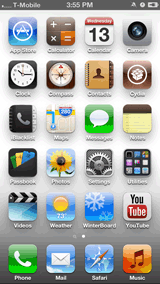
There is a dark gradient that starts at the bottom of the screen and extends half way up the screen fading as it goes up. Switching this graphic out with a transparent one (1 pixel wide by 960 pixels high) eliminates this effect. In the sample image a white wallpaper is being used to demonstrate the default gradient. |
|
| Location of graphic
/System/Library/CoreServices/SpringBoard.app/WallpaperGradientPortraitBottom@2x~iphone.png WinterBoard path Theme/Folders/SpringBoard.app/WallpaperGradientPortraitBottom@2x~iphone.png |
Wi-Fi icons |
 |
|
Two sets of icons are needed. White on black etch looks best on on black backgrounds and white on black shadow looks best on white backgrounds. |
|
| Location of graphic
Embedded within the Shared@2x~iphone.artwork file. WinterBoard path Theme/UIImages/ Dark background icons: WhiteOnBlackEtch_0_WifiBars@2x.png, WhiteOnBlackEtch_1_WifiBars@2x.png, WhiteOnBlackEtch_2_WifiBars@2x.png, WhiteOnBlackEtch_3_WifiBars@2x.png Light background icons: WhiteOnBlackShadow_0_WifiBars@2x.png, WhiteOnBlackShadow_1_WifiBars@2x.png, WhiteOnBlackShadow_2_WifiBars@2x.png, WhiteOnBlackShadow_3_WifiBars@2x.png |
