Creating a Cydia repository & adding your first package
Page 3 of 3Step 13.
Go to your cydiarepo folder and open your Packages file.
Copy the text below into this file.
MD5Sum: Paste the MD5 checksum here.
Maintainer: Who maintains the package
Description: Description of package
Package: Bundle Identifier
Section: Section it shows up in
Author: Who made the app
Filename: directory where the deb can be found
Version: Version of Package
Architecture: iphoneos-arm
Size: Unix Size (Right click on the .deb file and select Get Info. Go to the line that says Size and enter the numbers in parenthesis. Remove the commas.)
Homepage: URL for More Info
Name: Name of package
My file looked like this when I was done editing it. Don't forget to save this file.

Step 14.
Go back to the Terminal and enter the following:cd cydiarepo
Press enter.
Then enter this line:
gzip -f Packages
Press enter.
Note: every time you modify the Packages file, you have to make a new Packages.gz file.

Step 15.
You can delete the file Packages~ (if it appears). Double click the Packages.gz file to extract the Packages file.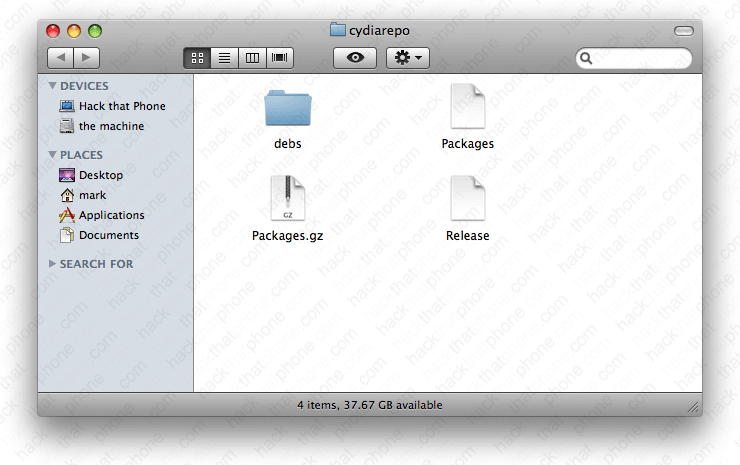
Whenever you update your .deb file, or add a new one to your repository, you have to update the Packages file, and then gzip that file. Anytime you add a new .deb to your repository, you have to add that same block of text that describes the program as well.
Step 16.
Drag your cydiarepo folder into the DS_Store_Cleaner program.
A message will appear confirming the deletion of the hidden .DS_Store files. Anytime you change the contents of your folders, these files are added. It is critical they be removed before uploading your files to your website for distribution.

Step 17.
Copy the contents of your cydiarepo folder to your webserver's public_html folder. I named my repository folder cydia. I like repository names to be short.
Step 18.
Launch Cydia. Press the Manage tab at the bottom, then press Sources. Press the Edit button.

Press the Add button. Enter the URL for your repository, then press the Add Source button. Note: I realize all my files created in TextEdit said hackthatphone.com and not hackthatphone.org. In my case my .com site is actually a subfolder hosted in my .org account. Your domain name most likely won't change unless you are doing the same thing as me.


Cydia will update your sources database to add your repository. Press the Return to Cydia button.


You will now see your repository in the list. Press the Done button. You can now press your repository name to see what's inside it.


Not only can you install the package from this screen, but you could press the Sections button and scroll down to your name in the list.


You can install the program here.


Here's what it looks like installing.


Ready to put some more things in your repository?
