Installing the Nintendo Entertainment System (NES) emulator
Emulators for almost every old hunk of junk computer (I personally programmed with BASIC on an Atari 400) or video game console have been around for ages. The Nintendo Entertainment System is no exception. There is a project called NES.app which has been created by "NerveGas". This emulator is based on the InfoNES core. Since this program is for sale (on 3.x firmware), I will also show you how to make a purchase on Cydia.Attention
I will be using YummyFTP to upload the files in this tutorial. These instructions can be applied to any files you want to add to your iPhone, provided you already have SSH installed. If you have not installed OpenSSH, or used YummyFTP before, then you must read this tutorial first.Step 1.
Launch Cydia and install NES 3. Launch NES 3.

|
You will be at the All Games screen. NES comes with a few free games installed.
Please do not e-mail me asking where to find games, I will not reply. I do not condone the illegal piracy of copyrighted Nintendo games, and I provide no support in obtaining or using pirated images. |

|
Step 2.
If you have your own ROMS you can install them easily. Navigate to /var/mobile/Media/ROMs/NES on your iPhone. You'll see the pre-installed games are already here.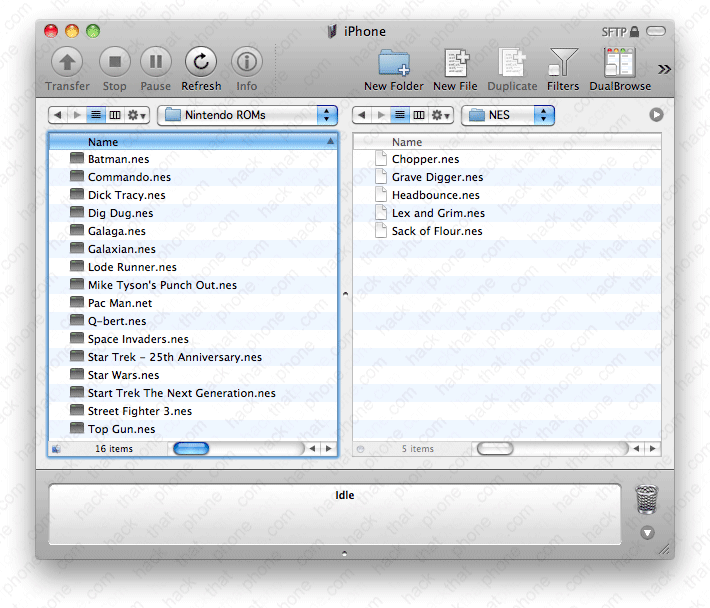
Place your ROMs into this folder.

Here's Batman. Make sure to check out the settings menu.


